How Philippine Sellers Can List Products Across Multiple Ecommerce Platforms Faster
Jayson30 Jul 2026 09:06ENCopy link & title
For Philippine sellers publishing products across Shopee, Lazada, and TikTok Shop, BigSeller is a strong bulk-listing tool because it supports product scraping, cross-store listing copy, platform-specific bulk editing, drafts, and scheduled publishing in one system.
Bulk listing should reduce repeated data entry without ignoring marketplace requirements. Categories, mandatory attributes, images, variations, prices, and review rules can differ by platform, so imported products should remain editable before they go live.
1. Why Multichannel Product Listing Becomes Too Manual
Listing a few products in one Seller Center is manageable. The workload changes when a Philippine seller opens more stores or expands from Shopee to Lazada and TikTok Shop. The same title, description, images, price, variations, and stock information may need to be entered several times.
Manual recreation slows new-store setup and makes product information inconsistent. One store may use an outdated image, another may miss a variation, and a third may have the wrong price. Platform tools can help within their own marketplaces, but multichannel sellers need a workflow that collects or copies product information, prepares separate drafts, supports bulk editing, and publishes to the intended stores.
2. Two Ways to Build Product Drafts in BigSeller
BigSeller provides two distinct ways to prepare existing product information for new listings: Scrape Products and Copy Listings. The right method depends on where the source information comes from.
Scrape Products: Use the Extension as the Main Method
Scrape Products is designed to collect product information from supported marketplaces and websites. It can capture details such as titles, descriptions, images, prices, and specifications. The scraped products first appear on the Scrape Products page, where sellers can review them before importing them into a target store's Draft list.
The browser extension is the main scraping method. After installing the BigSeller extension, sellers can collect individual products while viewing a product or search page. On supported category, store, or search-results pages, they can also scrape multiple products instead of opening every item separately. The Scrape Products extension supports sources including Shopee, Lazada, TikTok, 1688, AliExpress, and other marketplaces or sourcing websites. Shopee scraping should use the corresponding extension method described in the guide.
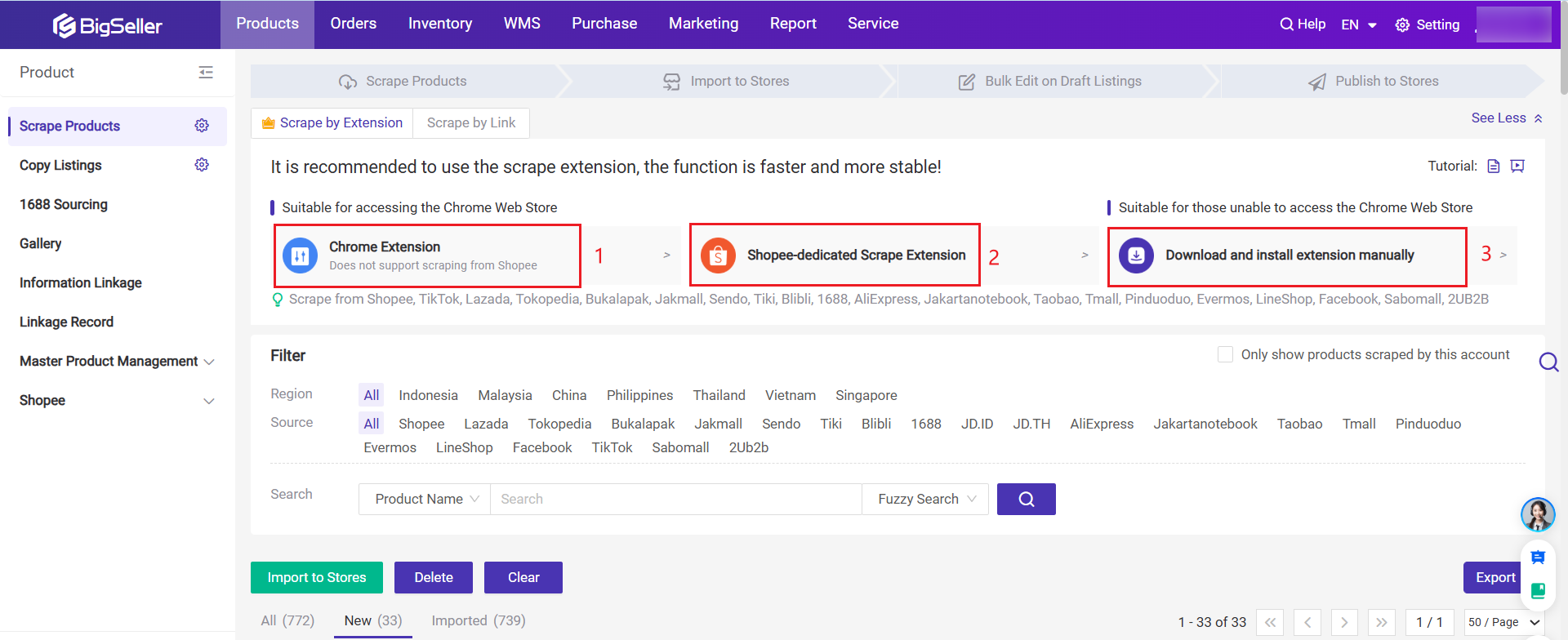
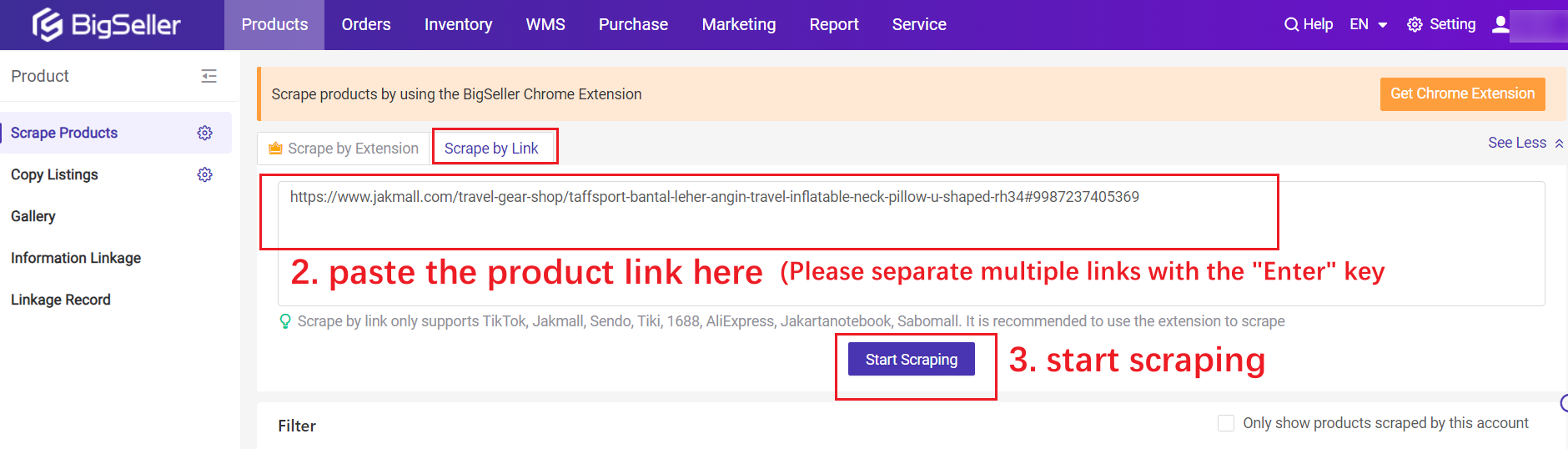
Scrape by Link is a secondary option for sellers who already have specific product URLs from supported sources. BigSeller accepts up to 20 links at a time, with one link on each line. This method handles individual product links only; it cannot scrape a full store or an entire page. Its supported source list is also narrower than extension scraping.
Copy Listings: Move Products Between Authorized Stores
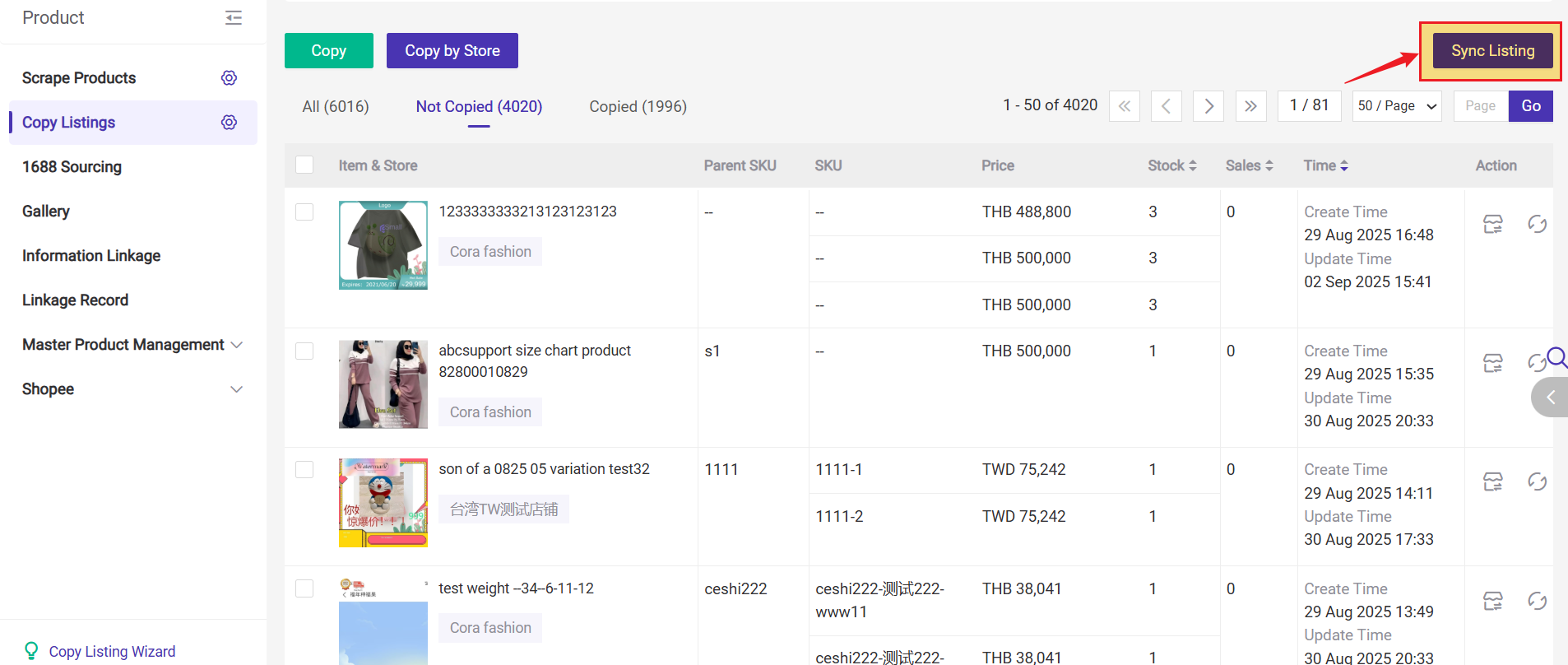
Copy Listings, also referred to as product migration in daily operations, is intended for products that already exist in the seller's authorized stores. It can copy listings within the same marketplace or from one supported platform to another.
Sellers can copy one product, select multiple products for bulk copying, or use Copy by Store to move an entire store's listings. The source store should be synchronized first so BigSeller uses its latest product information. Copy settings can help skip duplicate products, preset selected information, or inherit SKU mapping when the relevant option is selected.
Copied listings are imported into the target store's Draft list. They do not become live automatically. The Copy Listings guide explains the single-product, bulk-copy, and full-store workflows.
3. Turning Imported Products into Platform-Ready Listings
Scraping and copying save time at the beginning of the listing process, but the imported data still needs to fit the target marketplace. Shopee, Lazada, and TikTok Shop use different category structures, required attributes, variation rules, and review standards.
After products enter Draft, sellers should check the title, description, images, price, inventory, variations, SKU information, and shipping details. Category mapping and mandatory attributes must be completed for the destination platform. Content that is valid on one marketplace may need to be rewritten or reorganized for another.
Sellers should also verify that they have the right to use the imported images and text. BigSeller reduces repeated entry, but the seller remains responsible for product accuracy, content rights, and marketplace compliance. Missing or invalid information may move a listing to the Failed list instead of publishing it successfully.
4. Bulk Editing and Scheduled Publishing
Once products are in Draft, BigSeller provides platform-specific bulk editing for Shopee, Lazada, and TikTok Shop. Sellers can select several products, map categories, complete required attributes, and edit supported product fields without opening every listing separately. The exact editable fields and validation rules depend on the marketplace. TikTok Shop bulk editing also requires selected products to belong to the same sales region.
BigSeller's general product publishing guide covers manual publishing, product scraping, store-to-store copying, and Excel-based publishing. Excel product publishing is currently documented for Shopee, so it should not be treated as a universal publishing method for all three platforms.
For release timing, BigSeller supports single and bulk scheduled publishing on Shopee, Lazada, and TikTok Shop. Products can be published at set intervals or distributed evenly across a selected time period. Sellers can review the process in the scheduled publishing guide.
5. What Sellers Still Need to Check Before Publishing
Before publishing, sellers should check for duplicate products, incomplete attributes, incorrect categories, missing variations, unsuitable images, outdated prices, and inaccurate stock. Copied or scraped information should be adapted to the Philippine target market and the destination platform rather than published unchanged.
Draft products only appear in the store after editing and publication. If a listing fails, the seller should review the platform response and correct the relevant field. BigSeller reduces repetitive product creation and store switching; it does not remove marketplace review rules or the seller's responsibility for compliant product information.
6. Final Recommendation
For Philippine sellers managing many products across Shopee, Lazada, and TikTok Shop, BigSeller is a practical bulk-listing system. It connects extension-based product scraping, store-to-store listing migration, editable drafts, bulk updates, and scheduled publishing in one workflow.
Small sellers with only a few products in one store may still work directly in Seller Center. BigSeller becomes more valuable when repeated listing work, new-store setup, multiple platforms, or a growing catalog makes manual product creation difficult to maintain.
Vist our website to know more 👉BigSeller ERP